Postingan

Menampilkan postingan dengan label 64bit

Moving Android Studio and Android Emulator to 64-bit versions

Gambar
Posted by Sam Lin, Product Manager, Android With Project Marble , the Android Studio team focused our efforts on making the fundamental features and flows of the Integrated Development Environment (IDE) rock-solid. Performance is an underlying tenant to delivering a high quality IDE. To this end, we are sharpening our product focus and we will only support 64-bit operating systems going forward. Using Android Studio with an 64-bit operating systems enables efficient access to memory for both the IDE and the Android Emulator, and overall leads to a better development experience. While this change will not affect most Android Studio users, this change does have an impact if you use 32-bit versions of Microsoft ® Windows ® . To aid in this transition for those developers using 32-bit versions of Microsoft Windows, we want to give you details on the upcoming depreciation timeline plus steps to take to be ready for this upcoming change. Timeline To minimize the impact of this change towar...
Get your apps ready for the 64-bit requirement

Gambar
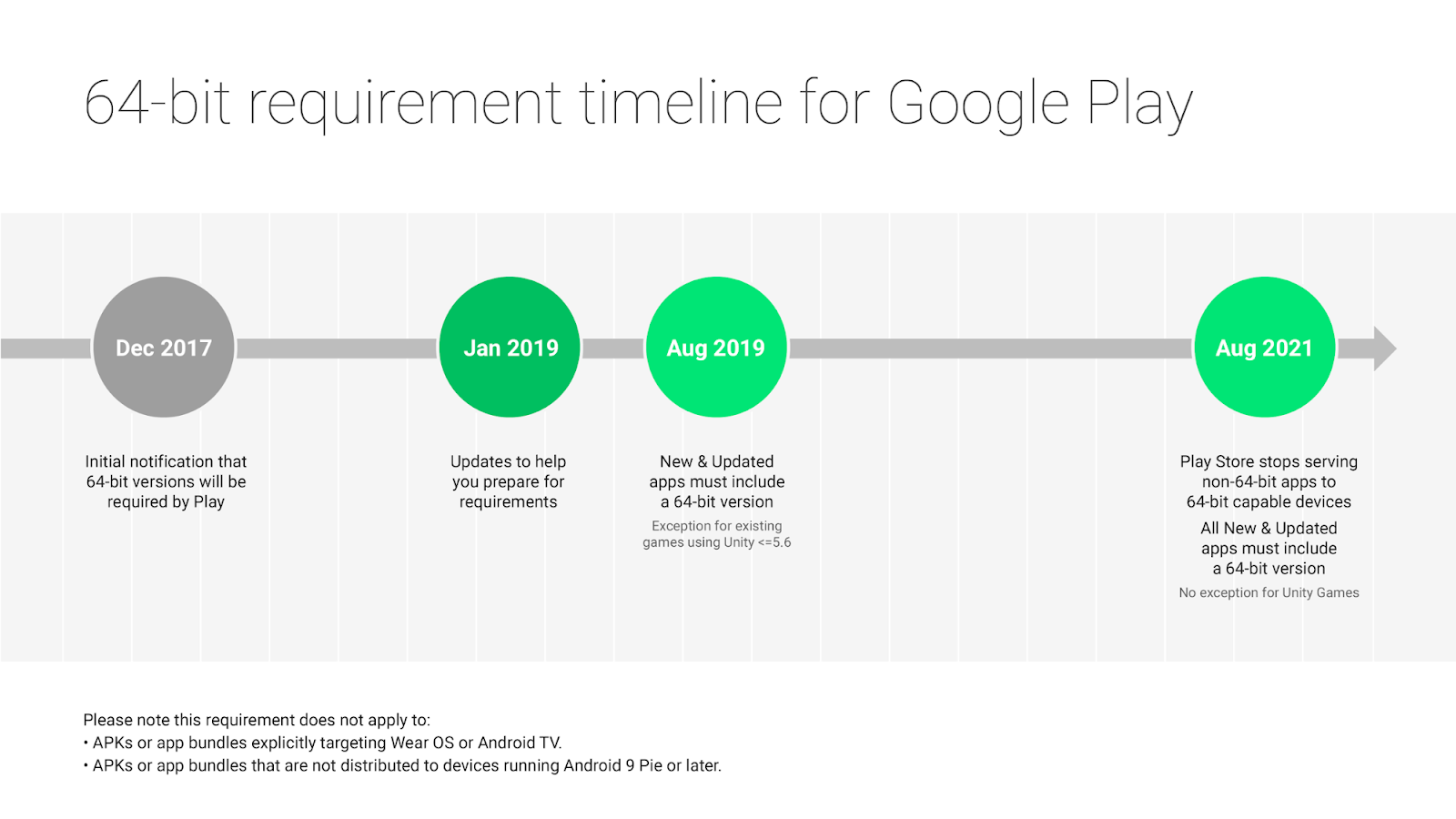
Posted by Vlad Radu, Product Manager, Play and Diana Wong, Product Manager, Android 64-bit CPUs deliver faster, richer experiences for your users. Adding a 64-bit version of your app provides performance improvements, makes way for future innovation, and sets you up for devices with 64-bit only hardware. We want to help you get ready and know you need time to plan. We’ve supported 64-bit CPUs since Android 5.0 Lollipop and in 2017 we first announced that apps using native code must provide a 64-bit version (in addition to the 32-bit version). Today we’re providing more detailed information and timelines to make it as easy as possible to transition in 2019. The 64-bit requirement: what it means for developers Starting August 1, 2019: All new apps and app updates that include native code are required to provide 64-bit versions in addition to 32-bit versions when publishing to Google Play. Extension: Google Play will continue to accept 32-bit only updates to existing games that use Unit...

Get your apps ready for the 64-bit requirement

Gambar
Posted by Vlad Radu, Product Manager, Play and Diana Wong, Product Manager, Android 64-bit CPUs deliver faster, richer experiences for your users. Adding a 64-bit version of your app provides performance improvements, makes way for future innovation, and sets you up for devices with 64-bit only hardware. We want to help you get ready and know you need time to plan. We’ve supported 64-bit CPUs since Android 5.0 Lollipop and in 2017 we first announced that apps using native code must provide a 64-bit version (in addition to the 32-bit version). Today we’re providing more detailed information and timelines to make it as easy as possible to transition in 2019. The 64-bit requirement: what it means for developers Starting August 1, 2019 : All new apps and app updates that include native code are required to provide 64-bit versions in addition to 32-bit versions when publishing to Google Play. Extensions: Google Play will continue to accept 32-bit only updates to existing games that use th...