Postingan

Menampilkan postingan dengan label Android Studio

Students Learn Android App Development with Google Developer Student Clubs

Gambar
Posted by Erica Hanson , Global Program Manager, Google Developer Student Clubs Google Developer Student Clubs , a program of university based community groups for students interested in Google developer technologies, recently started hosting study groups called Android Study Jams . The goal? Learn Android app development through hands-on codelabs in an online curriculum provided by Google. There are two tracks: one for students who are new to programming, and one for those who already have experience. Interested in participating? Facilitator materials are available for anyone to host Android Study Jams in their community - take a look and get to building. Google Developer Student Clubs are dedicated to helping students learn programming together, among peers, in a fun and interactive setting. While over 50 thousand students from all over the world have participated in these Android workshops, we wanted to highlight the exciting work from groups in Indonesia, Turkey, and Nigeria. F...

Announcing Jetpack Compose Beta!

Gambar
Posted by Anna-Chiara Bellini , Product Manager, Nick Butcher , Developer Relations Today, we’re launching the beta release of Jetpack Compose , our new UI toolkit designed to make it faster and easier to build native apps across all Android platforms. Compose offers modern, declarative Kotlin APIs, helping you build beautiful, responsive apps with way less code. Built to integrate with existing Android apps and Jetpack libraries, you can adopt Compose at your own pace by combining Android Views and Compose. With this beta release, Compose is API complete and has all the features you need to build production-ready apps. Beta also means API stable, so we won’t change or remove APIs. Now is a great time to start learning Compose and begin planning for how you will use it in an upcoming project or feature once it reaches 1.0 later this year. What's In Beta Our team has been developing Compose in the open with feedback and participation from the community. Since open sourcing deve...

Announcing Android Studio Arctic Fox (2020.3.1) & Android Gradle plugin 7.0

Gambar
Posted by Jamal Eason , Product Manager Today marks the release of the first version of Android Studio Arctic Fox (2020.3.1) on the canary channel, together with Android Gradle plugin (AGP) version 7.0.0-alpha01. With this release, we are adjusting the version numbering of Android Studio and our Gradle plugin. This change decouples the Gradle plugin from the Android Studio versioning scheme and brings more clarity to which year and IntelliJ version Android Studio aligns with for each release. New versioning scheme - Android Studio With Android Studio Arctic Fox (2020.3.1) we are moving to a year-based system that is more closely aligned with IntelliJ IDEA, the IDE upon which Android Studio is built. We are changing the version numbering scheme to encode a number of important attributes: the year, the version of IntelliJ it is based on, plus feature and patch level. WIth this name change you can quickly figure out which version of the IntelliJ platform you are using in Android Studio. ...

Android Studio 4.1

Gambar
Posted by Scott Swarthout, Product Manager Today, we’re excited to release the stable version of Android Studio 4.1 , with a set of features addressing common editing, debugging, and optimization use cases. A major theme for this release was helping you be more productive while using Android Jetpack libraries, Android’s suite of libraries to help developers follow best practices and write code faster. Based on your feedback we made a number of improvements to the code editing experience with IDE integrations for popular Android libraries. Some highlights of Android Studio 4.1 include a new Database Inspector for querying your app’s database, support for navigating projects that use Dagger or Hilt for dependency injection, and better support for on-device machine learning with support for TensorFlow Lite models in Android projects. We’ve also made updates to Apply Changes to make deployment faster. Based on your feedback, we’ve made several changes to help game developers with ...

Announcing Jetpack Compose Alpha!

Gambar
Posted by Karen Ng , Director, Product Management Today, we’re releasing the alpha of Jetpack Compose , our modern UI toolkit designed to help you quickly and easily build beautiful apps across all Android platforms, with native access to the platform APIs. Bring your app to life with dramatically less code, interactive tools, and intuitive Kotlin APIs. No matter where you’re working from -- whether it’s your kitchen table or an office, we know you need a programming language, an IDE and a powerful UI framework that can save you time and reduce how much code you need to write. So we built Jetpack Compose to make you (and us!) more productive with building UI. We started with Android Jetpack — taking the hardest, most common developer problems on Android and creating a suite of libraries that ensure high quality apps that work across all versions of the platform. Today, 84% of the top 10,000 apps in the Play store are using a Jetpack library. Then we heard how developers love Kotlin,...

New language features and more in Kotlin 1.4

Gambar
Posted by Wojtek KaliciÅ„ski, Developer Advocate, Android When we adopted Kotlin as a supported language on Android, and then shifted to a Kotlin-first approach, one of the main drivers was the excitement and adoption from the developer community. As Kotlin has grown, we’ve seen continued investment in the language from JetBrains (Kotlin's creators), the open source community, and increasingly our own teams at Google. Today we are excited to share the news about the Kotlin 1.4 release, the next milestone in the evolution of Kotlin, which contains new language features, improved compilers and tools. Below you'll find a brief rundown of some exciting new features in this release. You can read more about Kotlin 1.4 in the official announcement . New language features New language features introduced in Kotlin 1.4 improve the ergonomics of writing Kotlin code. Here's just one example: SAM conversions for Kotlin interfaces Previously, only functional interfaces (i.e. having jus...

11 Weeks of Android: Android Developer Tools

Gambar
Posted by Jamal Eason , Product Manager, Android This blog post is part of a weekly series for #11WeeksOfAndroid . For each of the #11WeeksOfAndroid , we’re diving into a key area so you don’t miss anything. This week, we spotlighted Android Developer Tools ; here’s a look at what you should know. The big news During the 11 weeks of Android, we launched a range of developer tool updates in Android Studio. As of today, you can find version 4.0 of Android Studio on the stable release channel, version 4.1 on the beta channel, and the very latest features of version 4.2 on the canary channel. The focus across each of these versions is a balance of app productivity and delivery of a high quality product that you can rely on for app development. For each day of this past week we highlighted improvements and tips in the key points of your development flow from app design, coding, deployment, build, app testing with the emulator, to app performance profiling. This blog highlights the content ...

Introducing the Motion Editor

Gambar
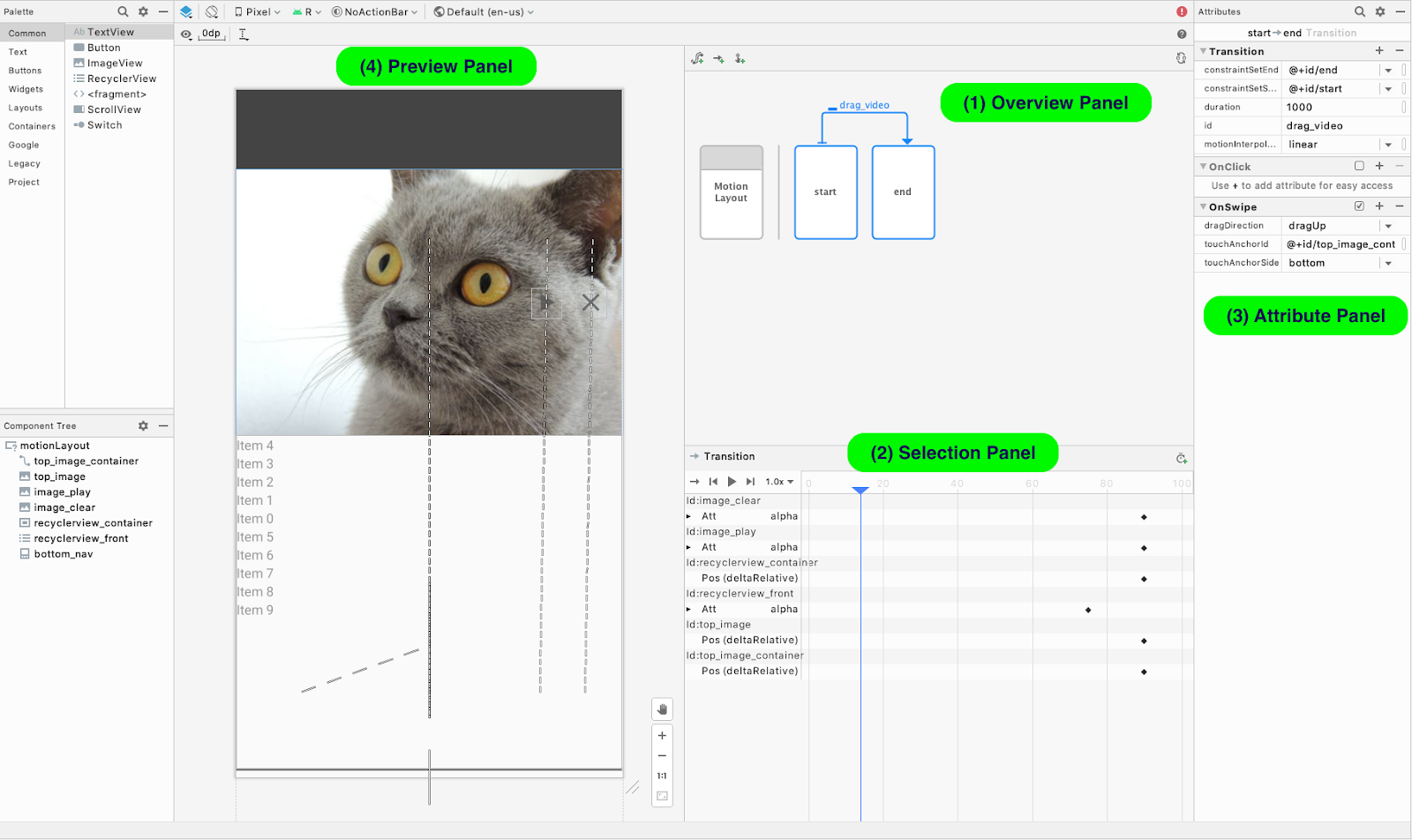
Posted by Scott Swarthout, Product Manager We spoke with the Android developer community and learned that animations are important for making UIs more intuitive and memorable. However, we also heard that adding complex animation to Android apps has been a difficult task.To address this problem, we created a powerful set of APIs with Motion Layout and a corresponding tool – Motion Editor, that when combined make it easier to build pixel-perfect animations. This blog is a quick tour of the new Motion Editor and how to use the latest features during your animation development. Additionally today, you can now watch a new video series specifically created to teach you about the various APIs included with MotionLayout. Watch here . Motion Editor is a visual design editor for the MotionLayout layout type, making it easier to create and preview animations. We just released the stable version Motion Editor in Android Studio 4.0 and we already see many developers using it to build animations. A...