Postingan

Menampilkan postingan dengan label Location

Improving urban GPS accuracy for your app

Gambar
Posted by Frank van Diggelen, Principal Engineer and Jennifer Wang, Product Manager At Android, we want to make it as easy as possible for developers to create the most helpful apps for their users. That’s why we aim to provide the best location experience with our APIs like the Fused Location Provider API (FLP). However, we’ve heard from many of you that the biggest location issue is inaccuracy in dense urban areas, such as wrong-side-of-the-street and even wrong-city-block errors. This is particularly critical for the most used location apps, such as rideshare and navigation. For instance, when users request a rideshare vehicle in a city, apps cannot easily locate them because of the GPS errors. The last great unsolved GPS problem This wrong-side-of-the-street position error is caused by reflected GPS signals in cities, and we embarked on an ambitious project to help solve this great problem in GPS. Our solution uses 3D mapping aided corrections, and is only feasible to be done at ...


Unwrapping the Android 11 Beta, plus more developer updates

Gambar
Posted by Stephanie Cuthbertson, Director, Product Management Editor’s note: The global community of Android developers has always been a powerful force in shaping the direction of the Android platform; each and every voice matters to us. We have cancelled the virtual launch event to allow people to focus on important discussions around racial justice in the United States. Instead, we are releasing the Android 11 Beta today in a much different form, via short-form videos and web pages that you can consume at your own pace when the time is right for you. Millions of developers around the world build their business with Android, and we're releasing the Beta today to continue to support these developers with the latest tools. We humbly thank those who are able to offer their feedback on this release. Today, we’re unwrapping the Beta release for Android 11 as well as the latest updates for developers from Kotlin coroutines, to progress on the Jetpack Compose toolkit, to faster builds ...

Android 11: Developer Preview 3

Gambar
Posted by Dave Burke, VP of Engineering Our teams, like all of you, continue getting used to a new normal. For many of us, that means working from living rooms, kitchens, backyards and bedrooms. So, from our homes to yours, we wanted to take a moment to share our most recent developer preview for Android 11. This update includes bug fixes and a set of productivity improvements for developers. You can see some of the highlights below, and visit the Android 11 developer site for details on all of the new features in Android 11. Today’s release is for developers and not intended for daily or consumer use, so we’re making it available by manual download and flash for Pixel 2, 3, 3a, or 4 devices. If you’re already running a Developer Preview build, you’ll receive an over-the-air (OTA) update to today’s release soon. As always, let us know what you think , and thank you for the helpful feedback you’ve shared so far. What’s in Developer Preview 3 In today’s release there are a number of ...

Android 11: Developer Preview 2

Gambar
Posted by Dave Burke, VP of Engineering It’s been a difficult few months for many around the world. The Android team at Google is a global one, and we, like many of you, are learning how to adapt to these extraordinary times. We want to thank you, our developer community, who have given us valuable feedback on Android 11 amidst these circumstances. We hope you, your families and colleagues are all staying well. Just as many of you are trying to press on with work where possible, we wanted to share the next milestone release of Android 11 for you to try. It’s still an early build, but you can start to see how the OS is enabling new experiences in this release, from seamless 5G connectivity to wrapping your UI around the latest screens, to a smarter keyboard and faster messaging experience. There’s a lot to check out in Developer Preview 2 - read on for a few highlights and visit the Android 11 developer site for details. Today’s release is for developers only and not intended for dail...

Turning it up to 11: the first Developer Preview of Android 11

Gambar
Posted by Dave Burke, VP of Engineering Android has led the way towards the future of mobile, with new technologies like 5G to foldable displays to machine learning built into the core. A hallmark of our approach is a strong developer community that provides early and thoughtful feedback, helping us deliver a robust platform for apps and games that delight billions of users around the world. So today, we’re releasing the first Developer Preview of Android 11, and building on a strong feedback cycle last year, we’re making this year’s preview available to you earlier than ever. With Android 11 we’re keeping our focus on helping users take advantage of the latest innovations, while continuing to keep privacy and security a top priority. We’ve added multiple new features to help users manage access to sensitive data and files, and we’ve hardened critical areas of the platform to keep the OS resilient and secure. For developers, Android 11 has a ton of new capabilities for your apps, like...

Giving users more control over their location data

Gambar
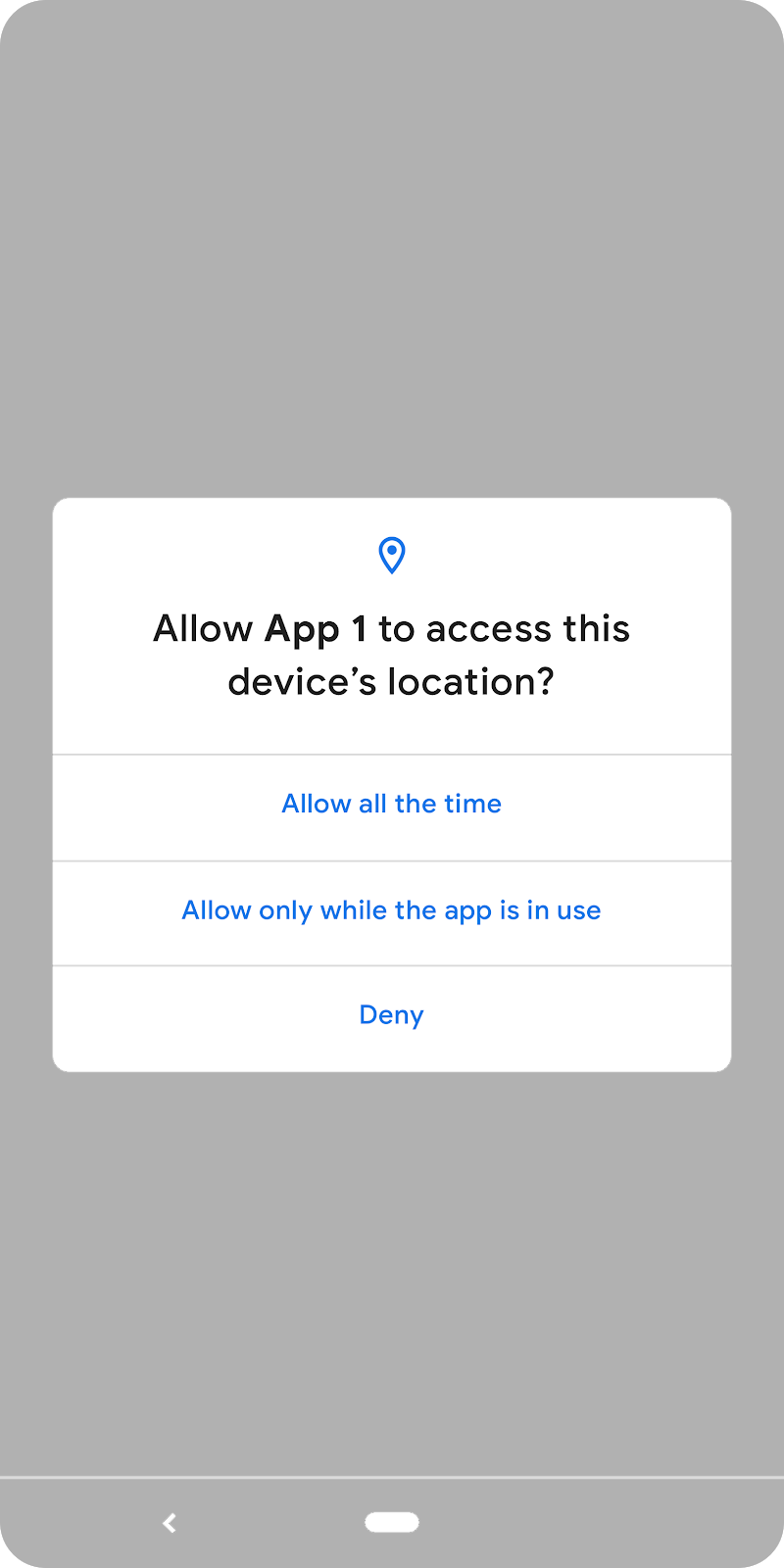
Posted by Jen Chai, Product Manager Location data can deliver amazing, rich mobile experiences for users on Android such as finding a restaurant nearby, tracking the distance of a run, and getting turn-by-turn directions as you drive. Location is also one of the most sensitive types of personal information for a user. We want to give users simple, easy-to-understand controls for what data they are providing to apps, and yesterday, we announced in Android Q that we are giving users more control over location permissions. We are delighted by the innovative location experiences you provide to users through your apps, and we want to make this transition as straightforward for you as possible. This post dives deeper into the location permission changes in Q, what it may mean for your app, and how to get started with any updates needed. Previously, a user had a single control to allow or deny an app access to device location, which covered location usage by the app both while it was in use ...